netviz

802.11 · WiFi

Encapsulation how one web request becomes a Wi-Fi frame

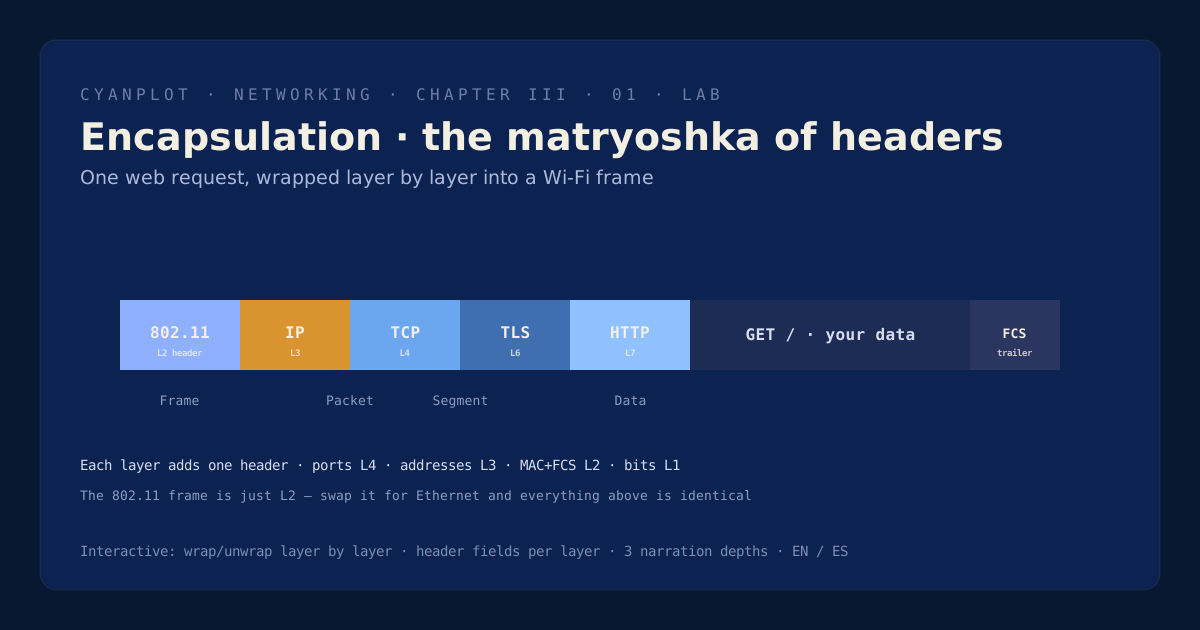
Opening a website sends your tiny request wrapped in five or six envelopes, each added by a different layer. Wrap it layer by layer and watch the packet grow from HTTP to a full 802.11 frame on the air — the clearest way to see what each layer adds, and the skill behind all packet analysis.

Sequence diagram poster of the WPA2 4-way handshake

Requesting scene from the content service…

5–6 envelopes
headers per request
L2
the 802.11 frame
Data → Segment → Packet → Frameports L4 · addresses L3 · MACs L2FCSsame stack over any link

What you'll learn

  • How each layer prepends its own header, turning Data → Segment → Packet → Frame → bits.
  • Which field lives at which layer — ports at L4, addresses at L3, MACs/FCS at L2 — and why that's your triage map.
  • Why the same TCP/IP/TLS stack rides unchanged over Wi-Fi, Ethernet or fibre — only the bottom wrapper changes.
  • How the 802.11 frame from the security plates is simply L2, and where the QAM/propagation labs take over at L1.

Envelopes inside envelopes

Layered networking works by encapsulation: each layer wraps the data from the layer above in its own header (and L2 adds a trailer too), so by the time your request leaves the antenna it's a frame nested several headers deep. Every header serves exactly one layer's job and is read only by its peer at the far end — ports for the transport demux, addresses for end-to-end routing, MACs for the local hop, and the FCS for error detection.

This lab wraps a real HTTPS request step by step, showing the packet on the wire growing, the PDU name changing at each layer, and the key fields each header carries. It's the bridge from Wi-Fi to the rest of networking: the 802.11 frame you met in the security plates is just the L2 wrapper, swap it for Ethernet and everything above is identical. Knowing which header owns which field is the entire skill of reading a capture — and of deciding which layer (and which team) owns a problem.

Atlas index